
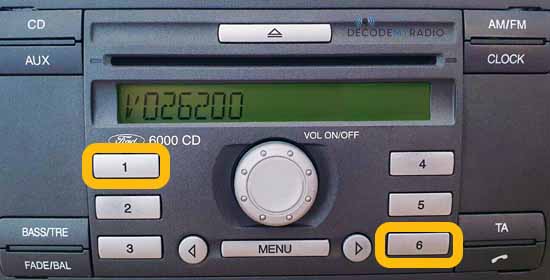

 radio serial number
Find Your Ford Radio Serial Number
Select your radio
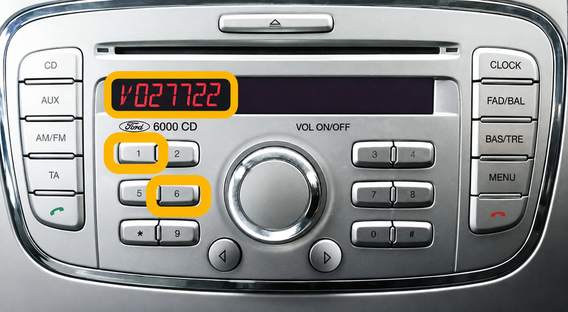
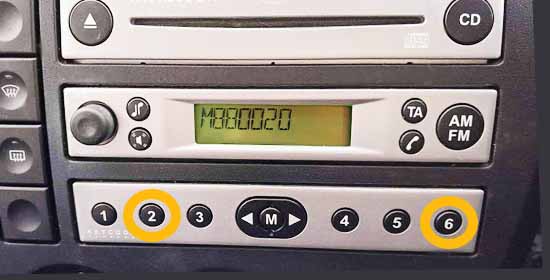
Ford 6000CD 2008–2012
Serial not showing on screen?
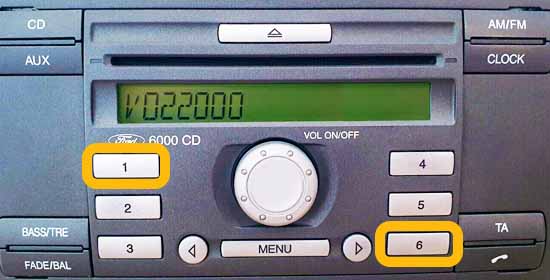
Ford 6000CD (2004–2007)
Serial not showing on screen?
Find the serial on the printed label by partly removing the radio.
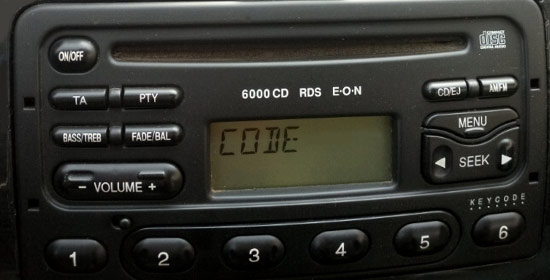
Ford 6000CD RDS E-O-N
Look for M followed by 6 digits.
Example: M123456
Serial Label Example
Ford 4500 RDS E-O-N
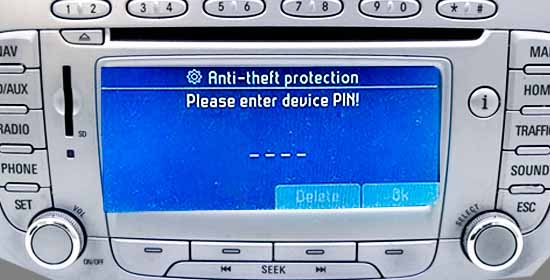
Ford Travelpilot EX, NX & FX
Look for BP or C7.
Examples: BP055366164122 C7E3A055577340348
Radio release keys are usually needed.
Travelpilot Label Examples
Tap a label image to enlarge.
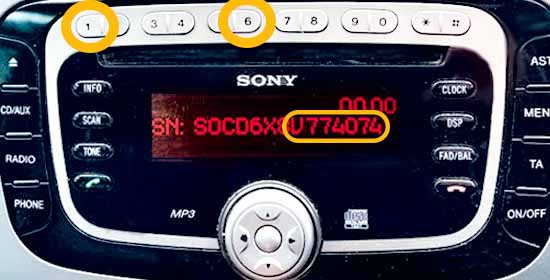
Ford Sony MP3

Can’t see your radio?
You may need to partly remove the radio from the dashboard to read the label on the casing.
Serial Number Label Examples
Tap a label image to enlarge.
Frequently Asked Questions
A Ford radio code is a 4-digit code used To get your code after a loss of power, for example, when you get a car battery replaced.
Once power is restored you may get a “LOCK” or “CODE” message on screen, this means a radio code is required to get your radio working again.
Sometimes you can find the radio code printed on the code card in the owner’s manual or on a sticker in the glovebox – failing that, we can recover your radio code from the radio serial number.
Usually there’s a code card located in the owner’s manual or sometimes you can find the code written on the label attached to the radio casing its-self. If you still can’t find your code, then we can recover your Ford radio code instantly from the radio serial number.
Your radio will ask a code after a power loss. Usually this is caused when your car battery gets disconnected or replaced. This is a more common issue with older ford radio models (pre 2016). If this happens, you can recover your code here using your radio serial number.
Sorry but this is not possible, the only way to fix a radio that’s locked is by entering the radio code. If you lost yours, we can recover it instantly from serial number.
No, not every ford radio model needs a code, for example, SYNC models from 2016 or newer don’t need a code. However, older radio’s such as 6000CD do require a code, to see which radio models need a code – see the finding your Ford radio serial number page.
Yes, the radio code is only used to activate your car radio and not the car itself. So you’ll still be able to drive and use the vehicle. If you would like your radio working again we can recover your Ford radio code here using the radio serial number.
Yes, but it requires tools and know-how, so it’s easier and cheaper to just recover your original Ford radio code from serial number using our service.
The serial number location depends on model – see our guide on finding your Ford radio serial.
Yes, you can get your radio serial number on-screen with certain models, by pressing “1” & “6” or “2” & “6” until the cycle process starts, your serial should appear on-screen and start with “V” or “M” followed by 6 digits, e.g. V123456.
If pressing “1” & “6” doesn’t display your serial number, it may be because there’s a prefix in front of it – for example: SOCD6X8V123456. If you still can’t find your serial number after checking for a prefix, then try holding “2” & “6” instead. And if all else fails, you can find the serial number on the printed sticker on the radio casing, but you’ll need to partly remove the radio from the dashboard.
No, at the moment the only way To get your code is by providing the unit’s serial number, which can then be decoded. You can enter your Ford serial number here to get your radio code.
After removing your radio, the printed sticker is found on the top, back or sides of the radio casing.
We currently support most Ford radio models before 2016 including: V-series, M-series, some Blaupunkt models, 6000CD, Sony MP3, 4500 RDS E-O-N, Navigation, 3000, 4000 RDS, 5000 RDS, 6000CD RDS E-O-N & Travelpilot – to see the full list of compatible units see finding your Ford radio serial page.
Our service works with most radios found in Ford vehicles before 2016 – such as the Ford Fiesta, Ford Transit, Ford Focus, Ford Mondeo, Ford Galaxy, Ford KA & more.
Please see our how to enter your code page for code entry instructions and a video demonstration.
This happens if you enter an incorrect code, allow 30-60 minutes and you should be able to re-enter the code again.
If your radio screen says “LOCKED” it means 10 wrong codes have been entered.
When this happens try holding down the number 6 for around 10 seconds, you should then be allowed another 3 code entry attempts.
Don’t waste the last 3 attempts though, after this your unit will be permanently locked – displaying the “LOCKED13” message.
Firstly, check the vehicle’s handbook for the “code” card – this has your 4-digit radio code printed on it. If you can’t find the code card then don’t worry, we can recover your radio code by serial number. Just find your radio serial number then enter it here to start the recovery process.
You can find your radio serial number for free by turning on the ignition (power) then holding “1” & “6” until the screen enters the cycle – Your serial number starts with “V” or “M” and should appear on screen. If this doesn’t work try holding “2” & “6” instead and if that doesn’t work – you can always find the serial of any radio on the sticker, attached to the casing of the radio. You’ll need to partly remove the radio from the dashboard (see the how to find your serial number page for model specific instructions and videos).
To find your Ford serial number without removal is easy, turn on the ignition (power) then hold “1” & “6” until the screen enters the cycle – the serial should appear starting “V” or “M” followed by 6 digits, e.g. V123456. Please note, with some models you may need to hold the “2” & “6” buttons instead. If neither of those methods work, you’ll need to partly remove the unit from the dashboard to get the serial from the sticker, there are methods to do this with or without removal tools.
Removing your Ford 6000CD from the dashboard is possible without radio removal tools – you can use a hair clip or flathead screwdriver by inserting it into each of the 4 corners one by one and prying the unit out gradually – see how to find serial number page for how-to videos that show you how this can be done.
If your Ford 6000 CD radio is locked you will need the 4-digit radio code to fix it again, usually it can be found in the owner’s manual on a code card. If you can’t find your code card, we can recover your radio code from the serial number instantly.
No, there are not any default, standard or common ford radio codes. Each code is unique to the radio unit and often tied to the radio serial number. We can however, generate your radio code from the serial number.
We know times can be hard – if you cannot afford to pay for your code then you can access it free by entering your serial via https://decodemyradio.co.uk/ford-radio-codes/?unlock=free – all we ask is if you can afford it, then please use our paid service.
Yes, we do provide a free code generator as an alternative to our paid service – all that we ask is that if you can afford to pay then use our paid service. You can access your code free by entering your serial at https://decodemyradio.co.uk/ford-radio-codes/?unlock=free
If you enter the wrong Ford radio code, “WAIT” will appear on screen, If you enter the wrong code 10 times “LOCKED” will appear on the screen, and if you enter the wrong code 13 times “LOCKED13” will appear on screen, that means the radio is permanently locked, when this happens, you will need to go to the dealership or buy a new radio unit.
After entering a wrong code, “WAIT” will appear on screen, after 30 minutes you will be given another entry attempt, but if the code didn’t work the first time, double check it’s the correct radio code before re-entering it again because repeated failed attempts can permanently lock your radio!
You may be entering the wrong code or not pressing the confirmation button after entering your code – Depending on the radio model, after code entry be sure to press and hold “5”, “Enter”, “Central Button” or “*” to confirm the code. If you get “WAIT” or “LOCKED” message on screen it means the code was wrong, when this happens, double check the code is correct and don’t keep entering it because entry attempts are limited and it can lead to permanent locking of your radio.
No, the radio code is a built-in security feature that cannot be changed without specialist equipment – we can however, recover the original radio code from serial number to get a locked radio working again.
Your radio may ask for a code after a battery replacement, this is a built-in security feature that kicks in when the radio has a power loss. If you have lost it, we can recover your 4-digit code by decoding the radio serial number.
“LOCKED 10” means 10 wrong codes were entered and “LOCKED 13” means your radio is permanently locked after 13 wrong code entry attempts.
If you see “LOCKED 10” the good news is not all hope is lost, you can press and hold “6” for 10 seconds for your last 3 entry attempts.
If you entered the correct code but your radio isn’t working – double check you pressed the correct confirm code button – depending on the radio model, you’ll need to press and hold “5”, “Enter”, “Central Button” or “*” to confirm the code. If you get a “WAIT” or “LOCKED” message on screen it means the code was wrong.
The fee depends on the model and radio type, generally Ford radio codes are cheap and we guarantee a working code or your money back – to see our pricing enter your serial number and the price will be shown on checkout before placing an order.
Ford radio codes are shown instantly on screen after payment as long as the serial number provided is correct.
Yes, if your radio code doesn’t work, we will issue a new working code or a full refund.
Yes, we provide radio codes for other brands as well from serial number, this includes:
Volkswagen
Honda
Renault
Audi
Skoda
SEAT
Nissan
Fiat
Dacia
Like with Ford, we offer a money-back guarantee with all radio codes we provide.
We currently offer email support, please use the contact page to get in contact.